Tank chemistry
Each tank carries its volume, operating window and the chemistry limits you analyze against. Enter the titration and the addition is computed from the tank volume and issued from inventory when you post it; brightener is replenished from the amp-hours the floor logs.
Setting up a tank
New tank, under Tanks, records what the bath is and how it is run:
- Identity
- Tank ID, name, function (cleaner, etch / deox, strike, plate, anodize, seal, passivate, rinse and so on), chemistry such as "Sulfamate nickel", line and location.
- Working volume and temperature
- Volume in gallons or liters, and the operating window in °F or °C.
- Equipment
- The rectifier from the equipment list, the anodes, filtration and agitation.
- Schedules
- Analysis interval in days and the next analysis due; last makeup, a dump interval and the next dump due.
- Amp-hour replenishment
- The additive from inventory and how much of it is consumed per 1,000 amp-hours.
- Status and safety
- In service, out of service or dumped; the PPE text, which prints on travelers and the tank sheet.
Control parameters
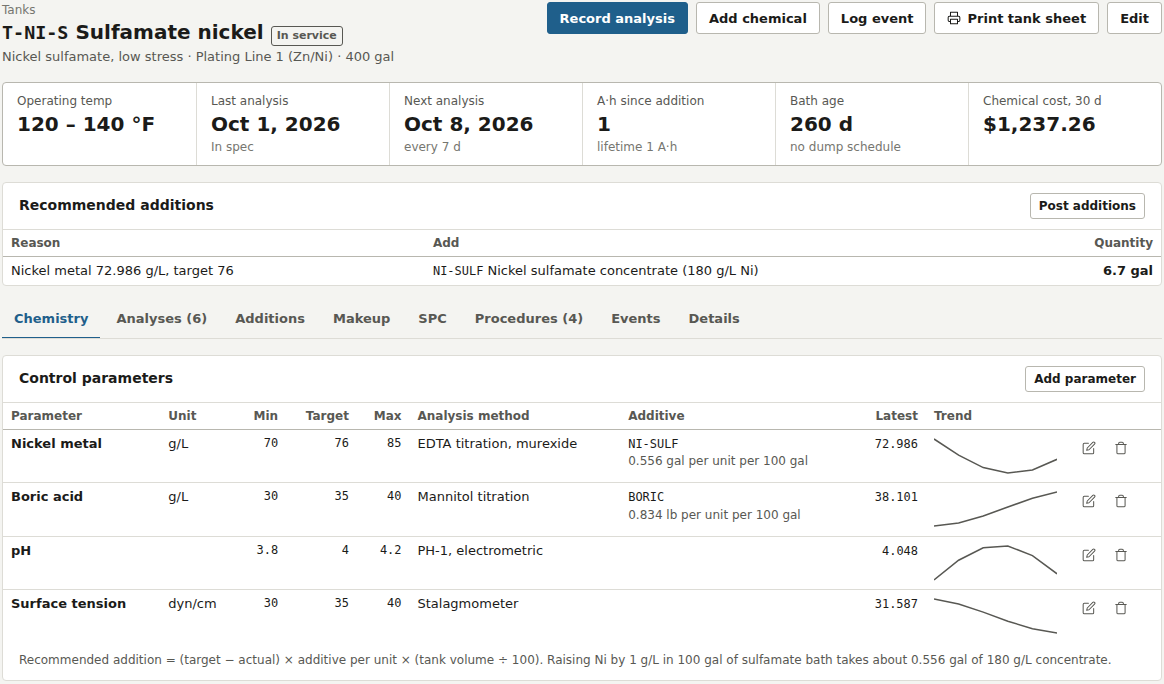
The Chemistry tab holds the parameters you titrate or measure: name, unit, minimum, target, maximum and the analysis method, each with the latest value, red when it is out, and a trend sparkline. A parameter can name the stock item that corrects it and how much of that item raises the parameter by one unit in 100 gallons (or liters) of bath. That one number turns a titration into an addition.
Recording an analysis
Record analysis opens a form with one row per parameter showing the limits, the target and the method. As each result is typed it is flagged in spec or out of spec. The analysis is stored with every value and the limits that applied at the time, the next analysis date moves forward by the interval, and the result is reported in one line: in spec, or which parameter is low and by how much.
For every parameter below target that has an additive on file, the recommended addition is (target − actual) × additive per unit × (tank volume ÷ 100). Raising nickel by 1 g/L in 100 gallons of sulfamate bath takes about 0.556 gallons of 180 g/L concentrate. The recommendations appear right after saving and stay on the tank page until posted. Post additions lets you edit each quantity to what was actually added; stock items are issued from inventory at their unit cost, and the addition is tied to the analysis that called for it.
Amp-hour replenishment
Every run logged against the tank from the traveler or the terminal adds its amp-hours (metered, or amps times time) to the tank's lifetime total and to the count since the last brightener addition. The tank page recommends that count times the rate per 1,000 A·h alongside any addition from analysis; posting it resets the count.
Additions
Add chemical posts an addition no analysis called for: a stock item or a non-stock description such as a DI water top-off, the quantity, and a reason of analysis, amp-hour, routine, makeup or other. The Additions tab lists every addition to the tank with the chemical, quantity, reason, cost (for finance roles) and who posted it; the Additions log under Tanks shows the same across all tanks for a date range with a cost total.
Makeup, dumps and events
The Makeup tab holds the recipe for a full working volume, in order of addition: stock chemicals or water, the amount, unit and instructions for each line, with a warning when stock on hand is short. Log event records what happened to the bath:
| Event | What it does |
|---|---|
| Makeup | Optionally issues the recipe from inventory, sets the tank in service, resets the amp-hour count and schedules the next dump |
| Dump | Marks the tank dumped |
| Filter change, anode change, carbon treatment, dummy plating, cleaning, heater / cooling, other | Dated and noted in the Events tab |
Mark out of service and Mark in service, on the Details tab, take a reason and log it as an event. Starting an operation in a tank that is out of service or dumped is blocked; a tank out of spec or overdue for analysis gives a warning instead.
SPC
The SPC tab draws an individuals chart for each parameter over the last 30 analyses: the points, the mean, control limits at three sigma, and the spec band dashed. Western Electric rules flag drift: a point beyond 3σ, 2 of 3 beyond 2σ, 4 of 5 beyond 1σ, 8 in a row on one side of the mean, and 6 rising or falling in a row. Cpk is computed against the limits with 1.33 as the target. Rule violations across all tanks are listed on the Quality page.
Procedures and the tank sheet
The Procedures tab holds written procedures per tank, typed as safety, operating, makeup, analysis, maintenance or dump, each with a revision. Print tank sheet produces a form with the tank's barcode, its volume, temperature, rectifier, anodes, agitation and filtration, the schedules, the PPE, the control limits with the method and the correcting chemical for each, the makeup recipe, every procedure in full, and a blank log for analyses and additions written at the tank.