Getting started
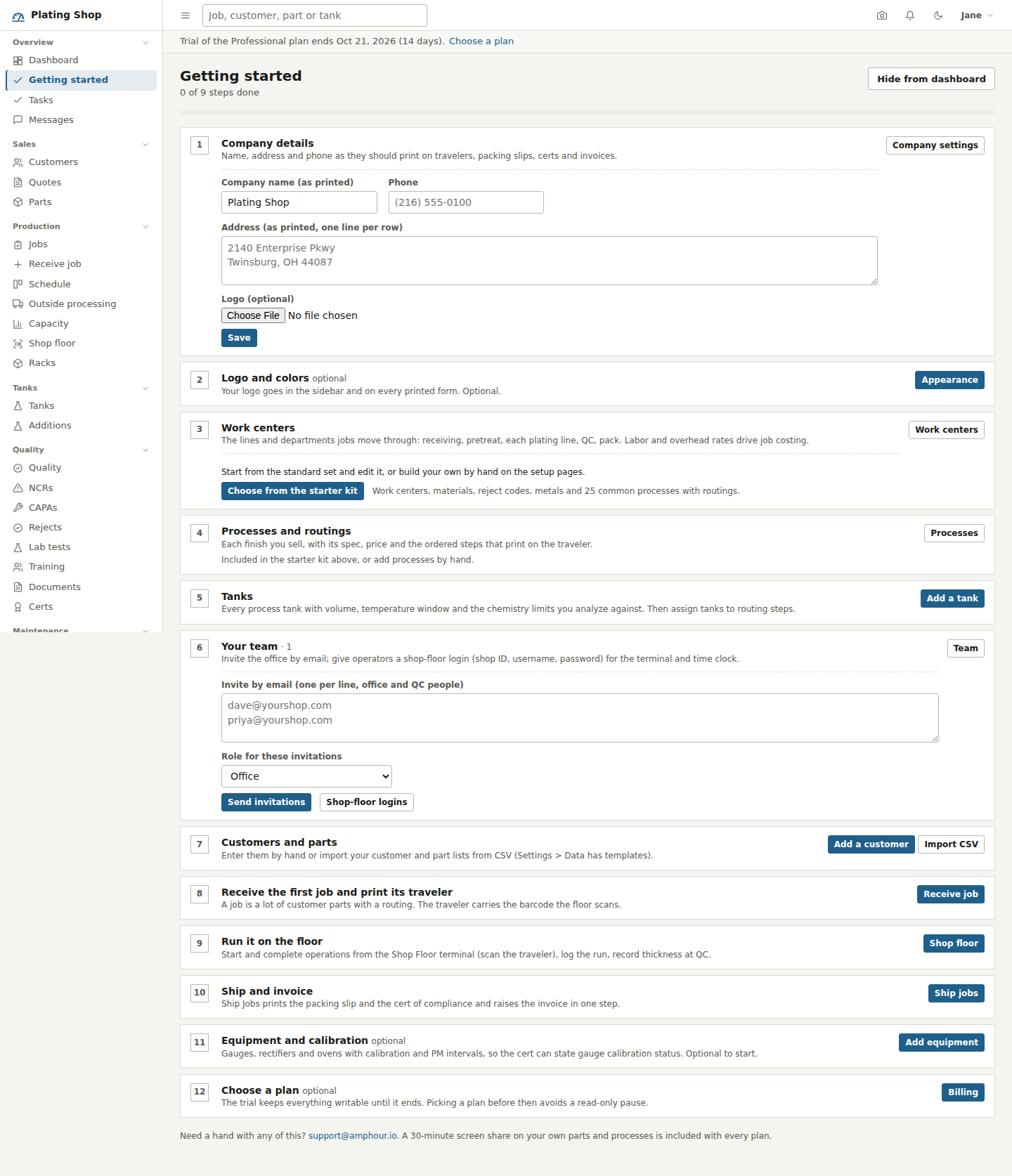
A new shop lands on a checklist that is computed from its own data, with a starter kit of work centers, materials, reject codes and 25 process routings.
The trial and the sample shop
Start a trial creates your account and your shop. The trial runs 14 days on the Professional plan and needs no card. A promotion code from a flyer or an email, entered on the sign-up form or later under Settings > Billing, makes the trial longer; one code per shop. The sign-up form has a box, checked by default, labelled "Include sample data (customers, tanks, processes, jobs)". Leave it checked and the shop opens with 13 tanks, 9 open jobs, real routings and a few weeks of history, so you can see how a job, a traveler, a tank analysis and a cert connect before you enter anything of your own.
The Getting started page lists a job through the shop in order: receive a job, print its traveler, scan it on the shop floor terminal, record a titration on a tank, record thickness at QC, ship it, then look at the dashboard. When you have seen enough, the shop owner presses "Clear sample data and start my shop" and types CLEAR. Every sample customer, part, job, tank, invoice and record is deleted; your login, settings and chart of accounts stay. Nothing in the sample shop is billed or visible to anyone else.
The tour and the manual
A shop that starts without sample data, or one whose sample data has just been cleared, is offered a guided tour: a spotlight walks through the sidebar and every main screen in about five minutes, one short card at a time, with Back, Next and End tour. It can be restarted at any time from the name menu in the top bar. The last card links to the manual, which describes every screen and how the parts connect, as a web page at amphour.io/manual and as a PDF at amphour.io/manual.pdf.
The checklist
Getting started sits in the sidebar under Overview for administrators and managers until the list is complete. It is not a wizard with a saved position: each step is checked against the shop's tables, so it stays true however the data got there, typed, imported or created by the starter kit.
| Step | Done when |
|---|---|
| Company details | Name, phone and address are set, as they print on travelers, packing slips, certs and invoices |
| Logo and colors (optional) | A logo is uploaded under Settings > Appearance |
| Work centers | At least one work center exists |
| Processes and routings | At least one process has routing steps |
| Tanks | At least one active tank exists |
| Your team | A second staff login exists or an invitation is outstanding |
| Customers and parts | At least one customer and one part |
| Receive the first job and print its traveler | A job exists |
| Run it on the floor | An operation has been completed |
| Ship and invoice | A shipment exists |
| Equipment and calibration (optional) | A piece of equipment exists |
| Choose a plan (optional, hosted shops) | A subscription is active |
Company details, the starter kit and team invitations are done right on the page; the rest link to the screen where the work happens. The dashboard shows a card with the next step until a manager hides it.
The starter kit
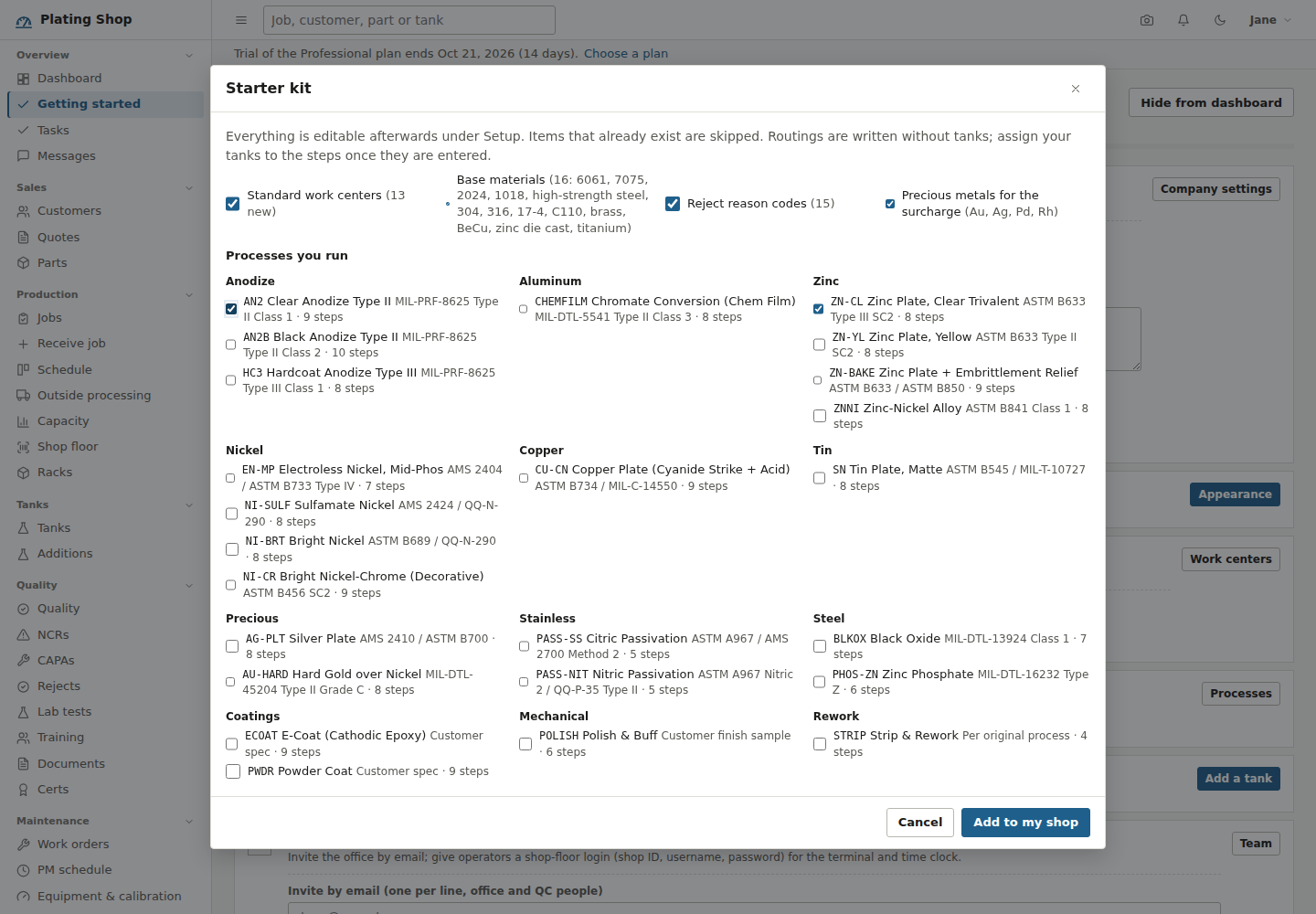
"Choose from the starter kit" opens a picker. Everything in it is editable afterwards under Setup, and items that already exist in your shop are skipped.
- Standard work centers
- 13 of them, from Receiving / Inspection through the pretreat, anodize, plating, electroless nickel, passivation, bake and paint lines to Final Inspection and Pack & Ship, each with a labor rate and an overhead rate for job costing.
- Base materials
- 16 materials with process notes: 7075 is etch-sensitive, 2024 smuts after etch, high-strength steel gets blast and no acid pickle, 17-4 PH prefers citric passivation.
- Reject reason codes
- 15 codes, from adhesion and blistering to rack marks and count short.
- Precious metals
- Au, Ag, Pd and Rh with a base price for the surcharge.
- Processes you run
- 25 processes grouped by family: anodize, chem film, zinc, zinc-nickel, nickel, copper, tin, silver, hard gold, passivation, black oxide, phosphate, e-coat, powder, polish, strip and rework. Each has its spec, a default price and unit, a minimum lot charge, a thickness range and an ordered routing with time, temperature, current density, voltage and work instructions per step.
Routings are written without tanks, because every shop's tanks are its own. Each step that needs one carries an instruction such as "Tank: assign your sulfamate nickel tank to this step under Setup > Processes" until you do.
Your team
Office and QC people are invited by email from the checklist or from Settings > Team, with a role for the batch: Office, Manager, QC or Administrator. If the server has no email configured, the invitation links are shown for you to send yourself. Operators do not need an email address: give them a shop-floor login (shop ID, username, password) for the Shop floor terminal and the Time clock.
| Role | Can reach |
|---|---|
| Administrator | Team, billing, settings, audit trail, and everything below |
| Manager | Production, quality, accounting; can invite staff |
| Office | Sales, shipping, accounting |
| QC | Production, quality, shipping; no accounting |
| Operator | Shop floor and time clock |
| Customer | Their own jobs, certs and invoices in the portal |
Bringing in your lists
Settings > Data has a CSV template for each of customers, parts, inventory items, vendors, materials, processes, tanks, racks, training courses and permits. Download the template, fill it in, save as CSV and upload. Rows with a code that already exists are updated, and references such as a part's customer or process can be given by code or by name. The same page has a full backup download and CSV and JSON exports.
A 30-minute screen share on your own parts and processes can be booked at any time, onboarding and import help come with the Business plan, and support@amphour.io answers questions on every plan.