Invoicing, receivables, ledger and time
The invoice is raised from the shipment, so what was shipped is what gets billed. Receipts, aging, statements, a double-entry ledger, the time clock and the reports are in the same system, so nothing is retyped into a second one.
Invoices from shipments
On the Ship page, ticking the invoice option raises the invoice with the packing slip and the cert. A shipment shipped without one shows a "not invoiced" badge in the Shipments list and an Invoice button on its page; the Invoices page has an Uninvoiced shipments button. Each shipped job becomes one line: job number, part number and revision, process and spec, pieces shipped, the billing quantity in the part's price unit, the unit price, and the minimum lot charge the first time a job is billed. A rework job prints "REWORK, no charge". When the process carries a precious metal, a surcharge is computed from the price on the ship date; see Precious metals.
The due date is the invoice date plus the customer's terms. Sales tax applies at the shop's rate unless the customer is tax exempt. Each line's revenue goes to the process's revenue account. With Email Invoices on, the customer's contacts get the invoice with a link to it in the portal.
New manual invoice is for charges that are not a shipment: expedite fees, tooling, strip-only work, engineering time. It takes a customer, date, customer PO and lines with description, quantity, unit price and revenue account.
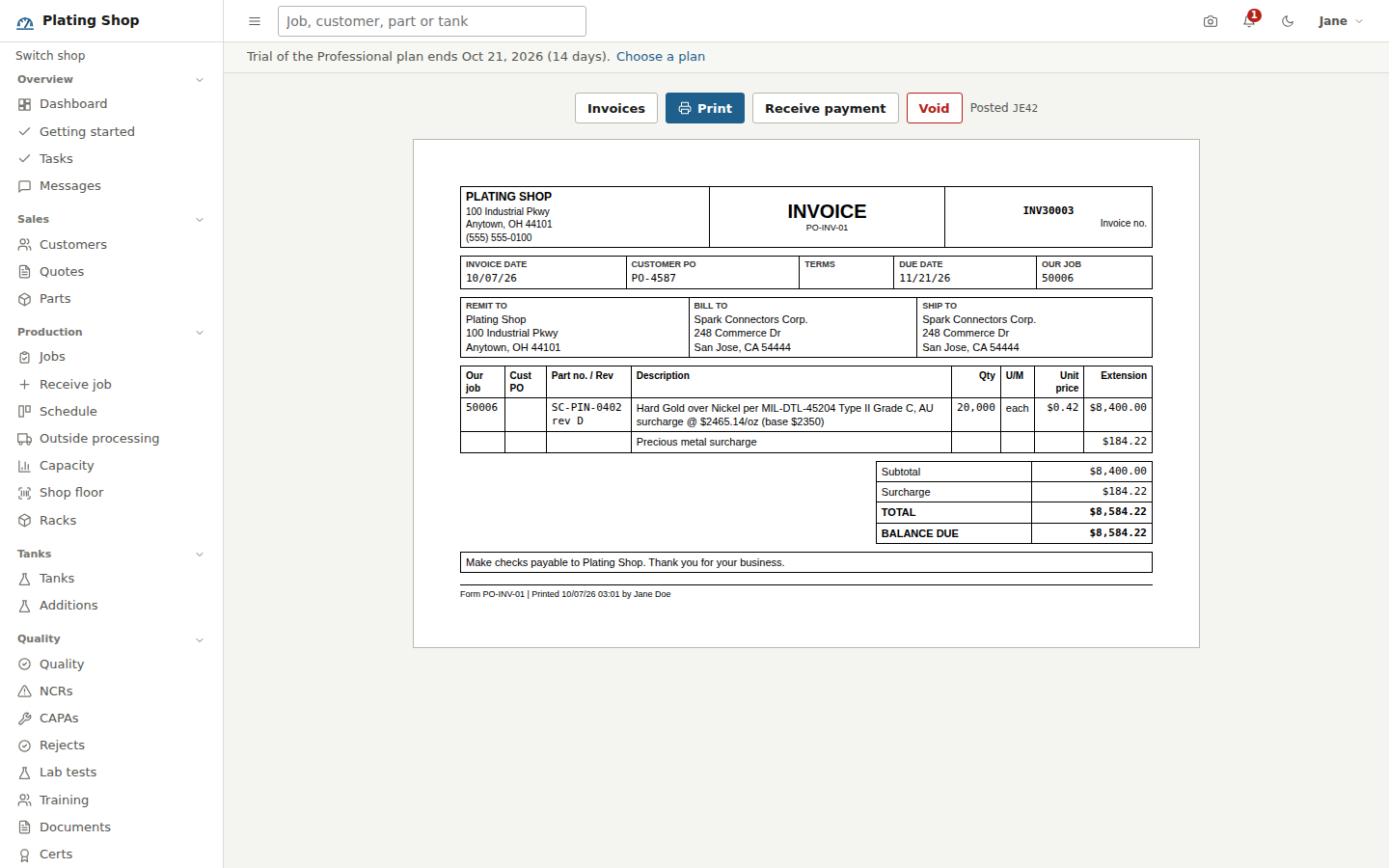
The invoice page
Form PO-INV-01 prints with remit-to, bill-to and ship-to blocks, the customer PO, terms, due date and your job numbers, the lines, subtotal, surcharge, tax, total, amount paid and balance due. The foot reads "Make checks payable to" your company followed by the invoice terms text from Settings > Appearance. Above the document: Receive payment while the invoice is open, Void while nothing has been paid against it, and the journal entry it posted as. Voiding posts a reversing entry and frees the shipment to be invoiced again.
Receipts, aging and statements
Receipts lists every payment with its method, reference and the invoices it paid. Receive payment takes the customer, date, method (check, ACH, wire, credit card or cash), a reference, the amount, and how much to apply to each open invoice; with nothing picked, it applies oldest first. Voiding a payment reopens its invoices and reverses the entry.
A/R aging groups open invoices by customer into Current, 1 to 30, 31 to 60, 61 to 90 and over 90 days past due. Clicking a customer opens their Statement of account (form PO-STM-01): the aging row, an opening balance, every invoice and payment in the period with a running balance, and the open invoices. It covers the last 90 days by default and prints.
General ledger
Every invoice, receipt, bill, vendor payment and inventory transaction posts a balanced journal entry on its own; there is no month-end batch. The chart of accounts is edited under Shop setup, and the accounts the system posts to are set under Shop setup > Company settings.
| Event | Debit | Credit |
|---|---|---|
| Invoice | Accounts receivable | Revenue per process, metal surcharge, sales tax |
| Customer payment | Cash | Accounts receivable |
| Vendor bill | Inventory or the line's expense account | Accounts payable |
| Vendor payment | Accounts payable | Cash |
| Inventory issue | Chemicals and supplies expense | Inventory |
| Void of any of these | A reversing entry dated today, linked to the original | |
The General ledger page shows the journal for a date range, filtered by source (invoice, payment, bill, vendor payment, inventory, manual), with an Open link back to the invoice or bill, and the chart of accounts beside it. New journal entry takes a date, memo and lines with running totals; the server refuses an entry that does not balance. Any account opens as a ledger with opening balance, each entry and closing balance.
Financials has three tabs: the income statement for a date range (revenue, cost of sales, gross profit, operating expenses, net income), the balance sheet as of a date (assets, liabilities, equity with current earnings, and a line that says Balanced or by how much it is not), and the trial balance. All print. Finance is for administrators, managers and office staff.
Time clock and timesheets
The Time clock page has your own Clock in / Clock out button and a badge punch box for a kiosk: scan or type a badge number and the screen shows who clocked in or out. Clocking out also stops any job labor the person still has running. The page lists everyone clocked in and the operation they are on.
Timesheets covers a date range, two weeks by default. The summary per employee shows regular hours, overtime (hours over 40 in a Monday-to-Sunday week), total, hours on jobs, utilization, and for office roles a gross pay estimate with overtime at time and a half. Below it are the punches; office roles can add, edit or delete one, and operators see only their own. Badge numbers and hourly rates are set under Settings > Team.
Reports
The Reports page runs one report for a date range, prints it and downloads it as CSV. The finance ones: Sales by customer and Sales by process (processing and metal surcharge separately), Job profitability (revenue, labor, overhead, materials, outside processing and margin per job), Labor by employee and Labor by work center. The Dashboard shows the finance roles open and overdue A/R, open A/P and sales this month.