Outside processing
Polishing, heat treat, NDT, paint: some steps leave the building. In Amp-Hour an outside step is an operation on the routing like any other, with a vendor, a lead time and a cost. Sending the lot out writes the PO and prints the packing list; receiving it back counts the pieces in and completes the step.
Mark a step as outside processing
On a process routing under Setup > Processes, each step has an Outside processing checkbox. Ticking it exposes three more fields:
- Outside vendor
- The vendor from the Vendors master who normally does this step.
- Vendor lead time (days)
- Sets the expected return date when the lot is sent out.
- Vendor cost per piece
- Goes on the purchase order the send-out creates.
When a job is received the routing is copied onto it, so the step shows an "outside" badge with the vendor name on the job page, and the printed traveler marks it (OUTSIDE: vendor) with the lead time and the standing instruction to print the vendor slip, count out, record the PO, count in on return and send rejects to NCR. Vendors are kept under Shop setup > Vendors with address, phone, terms and a default expense account.
Send the lot out
On the job page an outside step has a Send out button in place of Start and Complete. The dialog asks for:
- Vendor, preset from the routing.
- Quantity sent, preset to the good count from the previous completed operation, or the job quantity if nothing has been completed yet.
- Expected back (days), preset from the vendor lead time.
- Vendor cost per piece.
- Instructions to vendor, which print on the vendor slip.
- Create a purchase order for this work, ticked by default.
Send and create PO puts the operation into At vendor, records the date, quantity and expected return, stops any labor running on the step, and creates an open PO on the vendor with one line for the work, the quantity, the unit cost and the vendor's expense account. The PO is linked to the job and is listed under Payables > POs like any other. The job header shows an "at vendor" badge, and on the Schedule board the job moves to the At vendor lane with the vendor name and the return date. A job on hold, cancelled or shipped cannot be sent out.
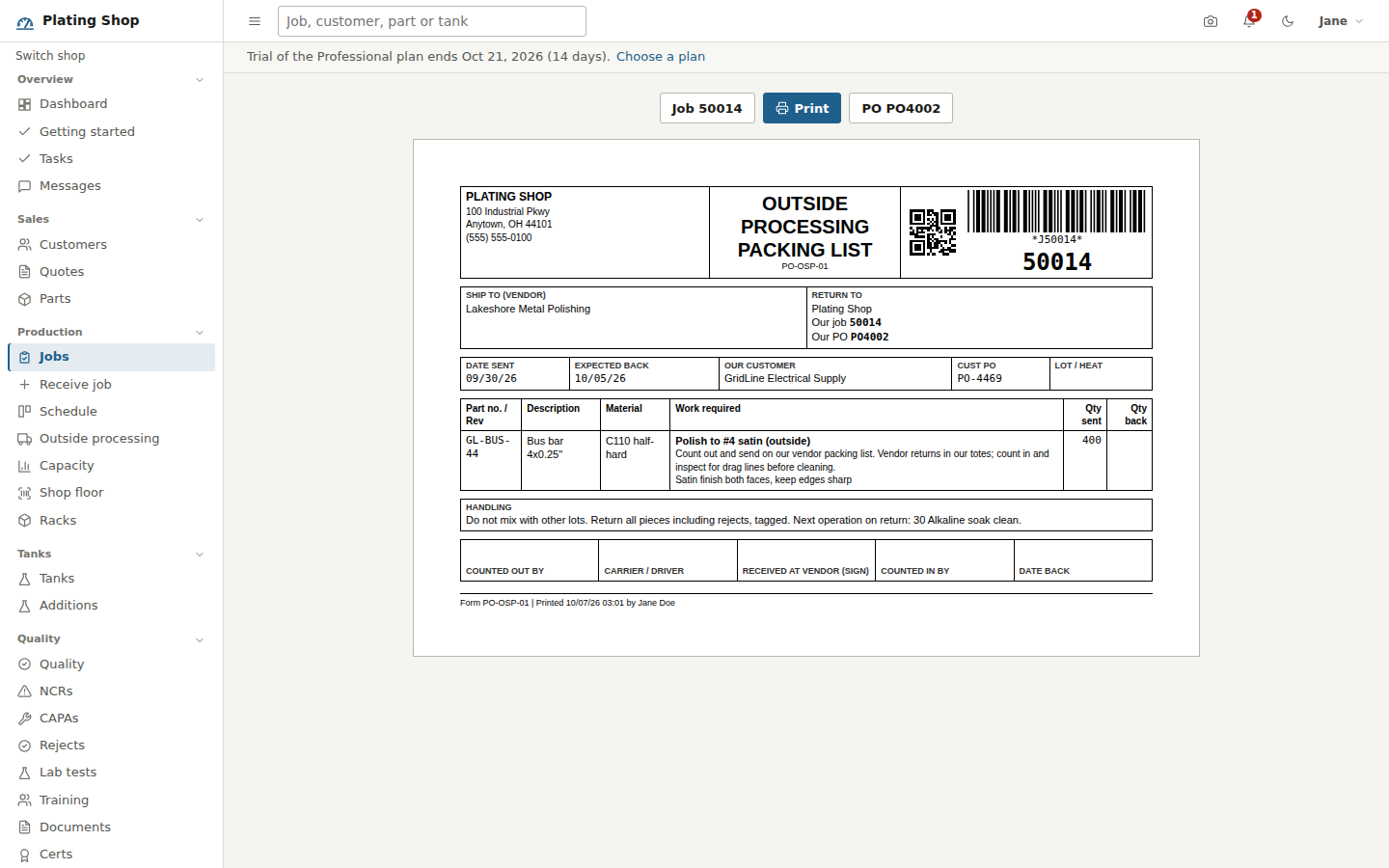
Vendor packing list
After the send-out the Outside processing packing list (form PO-OSP-01) opens for printing; it is also available from the Vendor slip button on the step and the Slip button on the Outside processing page. It carries the job number as a Code 39 barcode and a QR code, a ship-to block with the vendor's address and phone, a return-to block with your company name, job number and PO number, the date sent and expected back, your customer and their PO, lot or heat number, then one line with part number and revision, description, material, the work required (the operation name, its routing instructions and your instructions to the vendor), quantity sent and a blank Qty back cell. A handling block repeats the part's masking requirements and the material's processing notes, says not to mix with other lots and to return every piece including rejects tagged, and names the next operation on return. Sign-off cells are Counted out by, Carrier / driver, Received at vendor, Counted in by and Date back.
Track what is out
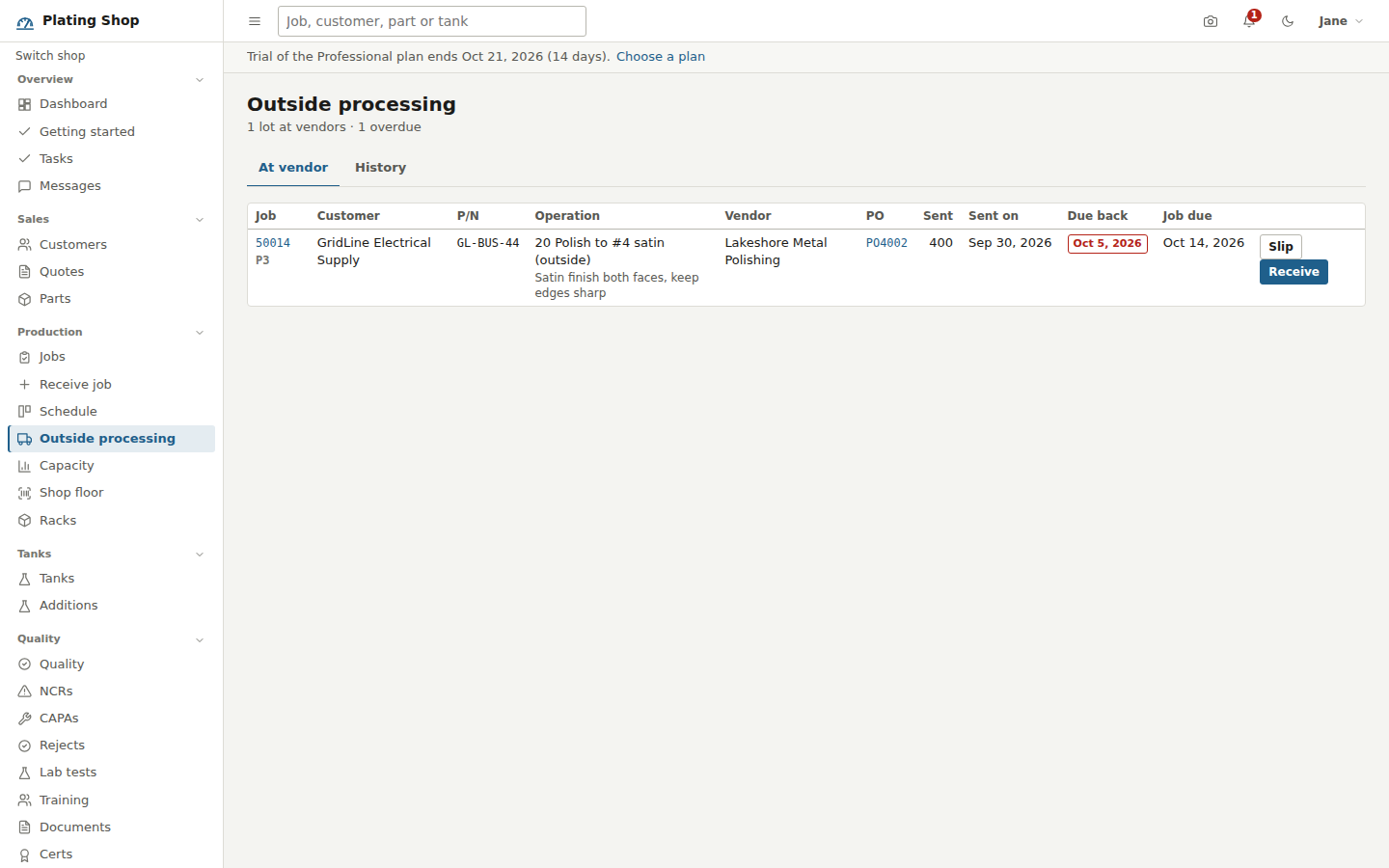
Production > Outside processing lists every lot at a vendor, oldest expected return first, with the job and priority, customer, part number, operation and your instructions, vendor, PO number, quantity sent, date sent, due back and the job's own due date. The subtitle counts the lots out and how many are overdue; an overdue return is flagged in red. Each row has Slip and Receive buttons. The History tab shows every outside step that has been sent, with the quantity returned.
The same lots appear on the Dashboard under Outside processing and maintenance with how many days late they are, and in the At vendor lane on the Schedule board.
Receive the lot back
Receive back on the job page opens a dialog that states what was sent, to whom and when, and asks for Quantity returned (preset to the quantity sent), Rejected at receipt, a reject reason code, a disposition (Rework, Scrap, Return to vendor, Use as is) and notes such as the vendor's packing list number or shortages. Receive then:
- Completes the operation with the returned count as its good quantity less rejects, so the next step and later Ship Jobs work from the right number.
- Marks the PO line received and the PO as Received, so Payables can enter the vendor's bill against it.
- Writes any rejects to the reject log against this step with the reason and disposition.
- Warns you if the count is short of what was sent, and records the shortage in the audit trail.
Undo on a completed outside step puts it back to At vendor rather than Running.
Cost
The vendor's bill, entered from the PO under Payables, carries the job number on its lines. Job costing on the job page shows it as Outside processing next to labor, overhead and chemicals, and the Job profitability report has an Outside column.