Environmental compliance
A plating shop answers to a wastewater permit, the hazardous waste rules and whoever inspects the SDS binder. Amp-Hour keeps those records next to the production records they come from, and flags the ones that are about to be late.
Compliance dashboard
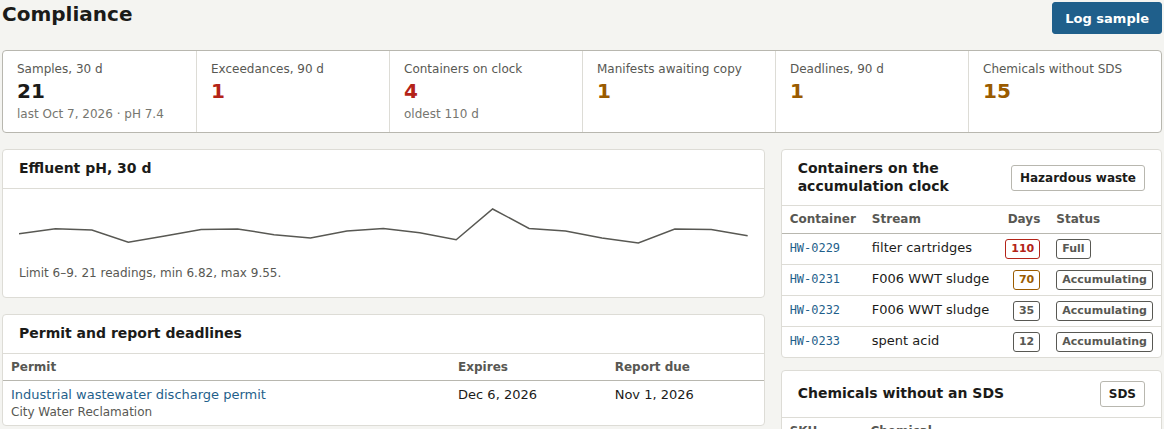
Environmental > Compliance opens with six counts: samples in the last 30 days (with the last sample date and pH), exceedances in the last 90 days, containers on the accumulation clock (with the oldest in days), manifests awaiting the signed copy, permit deadlines in the next 90 days and chemicals without an SDS. Each count links to its page. Below are a 30-day effluent pH chart with your limits and the minimum and maximum read, the permit and report deadlines table, the containers on the clock with their days, and the chemicals missing an SDS.
Wastewater log
Log sample, on the dashboard and on Environmental > Wastewater, records one self-monitoring sample: date and time, sample point (Final effluent, Clarifier outlet, Equalization tank, Cyanide destruct, Chrome reduction, or your own), pH, flow in gallons, temperature, and concentrations in mg/L for total chromium, nickel, zinc, copper, cadmium, lead, silver, cyanide, TSS, oil and grease and TTO. Each field shows the limit beside it. A notes field holds the corrective action.
On save the sample is compared with the limits. A sample within limits is marked in compliance; one outside is marked as an exceedance with the parameter, the value and the limit written out, and every administrator, manager and QC user gets a notification. The log page lists samples for a date range with the out-of-limit values in red, the result badge, the exceedance text, notes and who took the sample. Delete is there for duplicate or mistaken entries only; the page says so.
Limits are entered under Shop Setup > Company settings as Discharge limits, per your permit. The sample shop ships with pH 6 to 9 and the 40 CFR 433 daily maximums for metals. The log exports to CSV from Analysis > Reports (Wastewater discharge log).
Hazardous waste
Environmental > Hazardous waste has two tabs, Containers and Manifests.
- Container
- Label or ID, waste stream (F006 WWT sludge, spent plating bath, spent acid, spent caustic, cyanide waste, chromium waste, filter cartridges, contaminated PPE and rags, used oil, universal waste, other), contents, EPA waste codes such as F006, D002, D007, container size (55 or 30 gal drum, 5 gal pail, 275 gal tote, roll-off), Accumulation Start Date, storage location and status.
- Status
- Accumulating, full or shipped. The days on the clock count from the accumulation start; a container shows amber past 60 days and red past 75.
- Manifest
- Manifest tracking number, ship date, transporter, designated facility (TSDF), waste description and codes, quantity and unit, disposal cost, and whether the signed copy has come back.
Ship on a manifest opens a form for the manifest details and lists every container on site with the full ones pre-ticked. Recording it marks the ticked containers shipped and links them to the manifest. The Manifests tab shows each manifest's signed-copy state: Awaiting, or Overdue with the day count once 35 days have passed without the facility's copy, with a Mark received button that stamps today's date.
Permits
Environmental > Permits holds permits and registrations: wastewater discharge, air, hazardous waste (EPA ID), storm water, fire and hazmat, business license, Nadcap, ISO / AS9100, ITAR or other, with the issuing agency or registrar, permit number, issued and expiry dates, how many days before expiry to start renewal (default 90), reporting frequency (monthly, quarterly, semiannual, annual), the next report due date, the responsible person and the permit conditions. A permit expiring within 90 days or a report due within 30 days appears on the dashboard. Permits import from CSV under Settings > Data.
Safety data sheets
Environmental > SDS lists every inventory item in the chemical, precious metal and anode categories with its location and SDS. An SDS can be a link to the supplier's sheet (the SDS Link field on the item) or a PDF or image uploaded on this page, up to 10 MB. Items with neither show a red "missing" badge and are counted on the dashboard.
Retention and roles
The wastewater and hazardous waste pages state the three-year retention that applies to those records. Samples can be logged by any staff login; recording manifests, marking copies received, deleting samples and uploading SDS files need an Office, QC, Manager or Administrator role. Every action is in the audit trail under Setup. Shops that do not need the module can switch it off under Settings, which removes the Environmental group from the menu.