Precious metals
For shops plating gold, silver, palladium or rhodium: the daily price is entered once, every invoice carries the surcharge the price list did not anticipate, and a reconciliation shows how much metal went into the tanks against how much went out on parts.
Setting up metals, processes and parts
A metal has a symbol, a name, a unit (troy oz) and a base price, the metal price your price list was built on. The starter kit creates AU Gold, AG Silver, PD Palladium and RH Rhodium with base prices you then edit under Shop setup, or from the Metals and base prices button on the Metal prices page. A process has a Precious Metal field; set it on your gold and silver finishes. A part has a Precious Metal Factor in troy ounces per pricing unit: the metal that goes onto one piece (or one pound, or one square foot, whatever the part is priced per). The surcharge needs both: a metal on the process and a factor on the part.
Entering prices
The Metal prices page shows each metal with its latest price, the change from the previous price, the date, a 90-day sparkline, the base price and the resulting surcharge per ounce. Office, manager and administrator roles enter prices in the form beside it: a price date and a price per metal. Entering a price for a date that already has one replaces it. Below is the 90-day price history. The Dashboard shows the current prices as well.
Nothing fetches prices from a market feed. Someone types in the morning fix, or the price your refiner quotes, and that is the price used from that date until the next entry.
How the surcharge is computed
When a shipment is invoiced, each line whose process carries a metal gets a surcharge:
surcharge = metal factor × billed quantity × (price on ship date − base price)
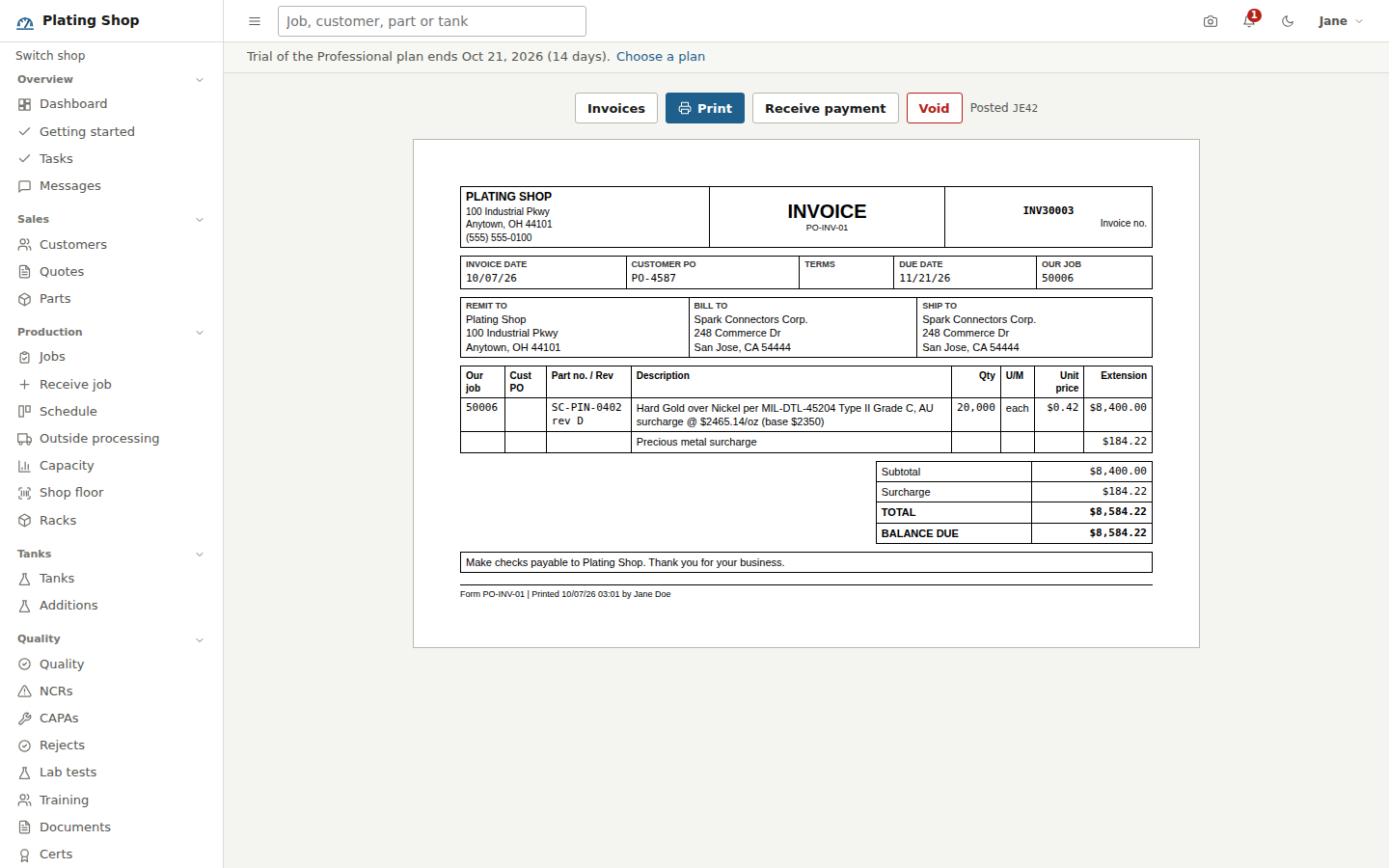
The price on the ship date is the latest price entered on or before that date. When the price is at or below the base there is no surcharge. The line description names it, for example "AU surcharge @ $2465.14/oz (base $2350)", and the invoice prints a separate Precious metal surcharge line and a Surcharge row in the totals. In the sample shop, 20,000 pins at a factor of 0.00008 troy ounces each with gold at $2,465.14 against a base of $2,350 add $184.22 to an $8,400 invoice. The surcharge posts to its own revenue account, 4900 by default, so it is separate from processing revenue in the ledger and in the Sales by customer and Sales by process reports. Manual invoices carry no surcharge. The quote form tells the customer that prices for precious-metal finishes are based on the metal price on the quote date and that a surcharge applies when the daily price exceeds the base.
Metal in inventory
Gold salts, silver anodes and the like are inventory items in the category precious metal or anode, in troy ounces, with an SDS link like any other chemical. The sample shop carries AU-PKCN, potassium gold cyanide at 68.3% Au, in the vault. Receive them against a PO like any other stock, and get them into the tank through a tank addition that names the item, so the issue is recorded against the tank. The reconciliation depends on both habits.
Metal reconciliation
The Metal reconciliation page, for administrators, managers and office staff, covers a date range (90 days by default) with one row per metal:
- Purchased
- Quantity received on inventory items in the precious metal or anode categories whose SKU or name contains the metal's symbol or name.
- Added to tanks
- Quantity of those items posted as tank additions in the period.
- Plated out
- Invoiced quantity times the part's metal factor, for every invoiced job whose process carries this metal.
- Unaccounted
- Added to tanks minus plated out, with the percentage. Shown in red when it exceeds 20% of what was added.
- On hand
- Quantity in stock and its value at the latest price.
- Surcharge billed
- Total surcharge invoiced for the metal in the period.
A large unaccounted balance is usually one of three things: drag-out to the rinse and recovery, a part factor that has not been checked against a stripped-sample assay, or an addition posted as a description instead of a stock item so it never counted. The page says as much under the table.
Reports
Metal price history lists every price entered with the base and the surcharge per ounce it produced, for a date range, as CSV or print. Sales by customer and Sales by process show processing and metal surcharge in separate columns. Shops that do no precious-metal work can switch the Precious metals module off under Settings > Appearance and the group leaves the sidebar.