Shop software for plating and anodizing job shops.
Amp-Hour prints the traveler, logs the run, keeps tank chemistry in spec and issues the cert of compliance when the job ships. Quoting, scheduling, invoicing and the wastewater log are in the same system.
No card needed. The trial opens on a sample shop so you can see travelers and tank sheets right away.
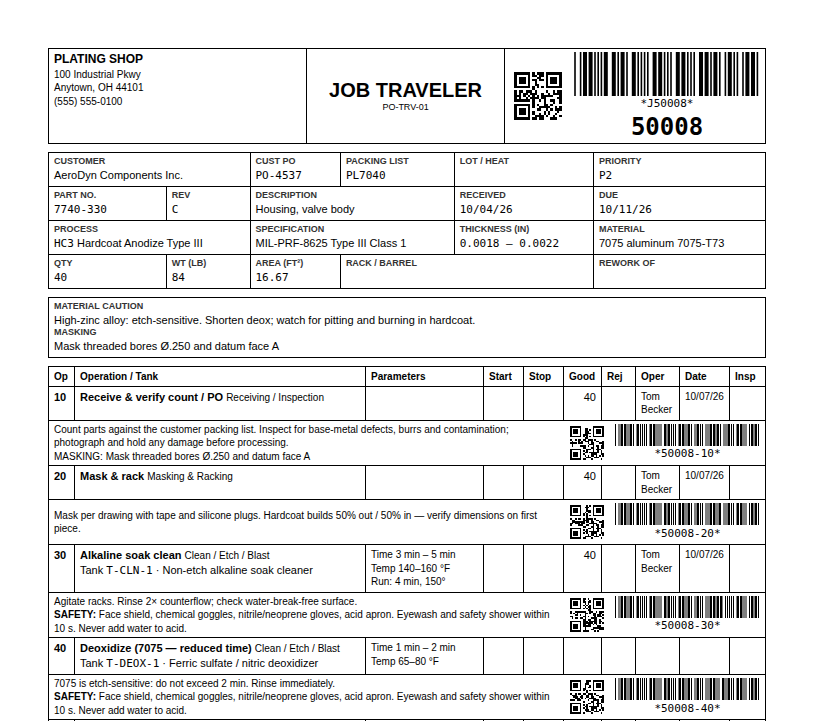
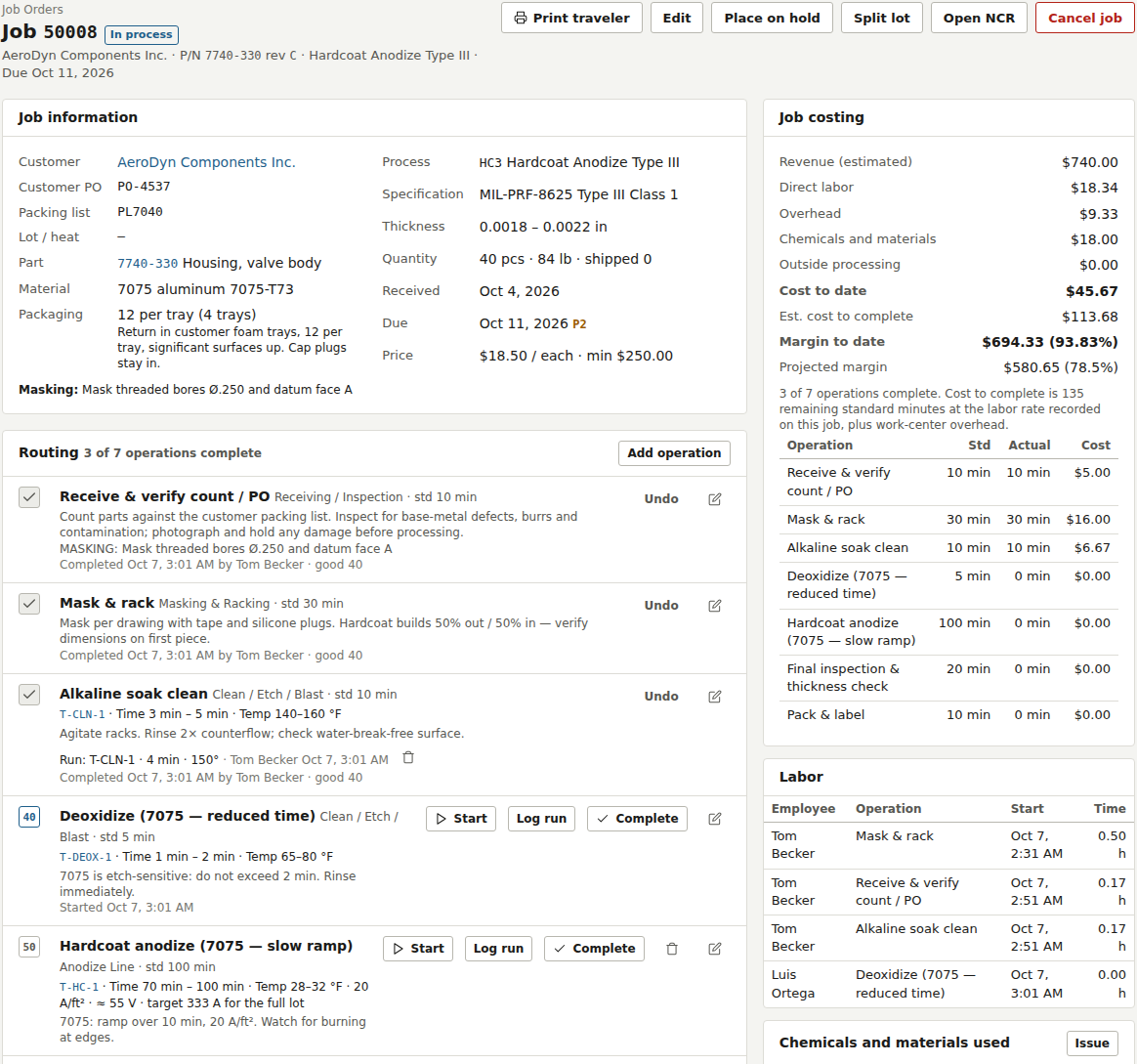
Built around the job.
For job shops doing anodize, zinc, nickel, chrome, chromate or passivation on customer-owned parts, from a few people to about eighty. For a Nadcap or AS9100 audit it holds the records an auditor asks for first: the traveler for every job, the run data logged against it, the bath analyses, and the gauge and its calibration dates on each cert. Wastewater results are checked against the limits from your permit, and a chrome shop keeps its surface-tension log and Cr(VI) exposure records here too.
1The traveler is the record.
Each finish carries its routing: tank, time, temperature, current density. Receiving a job copies it, prints the traveler with a barcode per operation, and the floor scans to start, log the run and complete. Anything outside the window is recorded as a deviation.
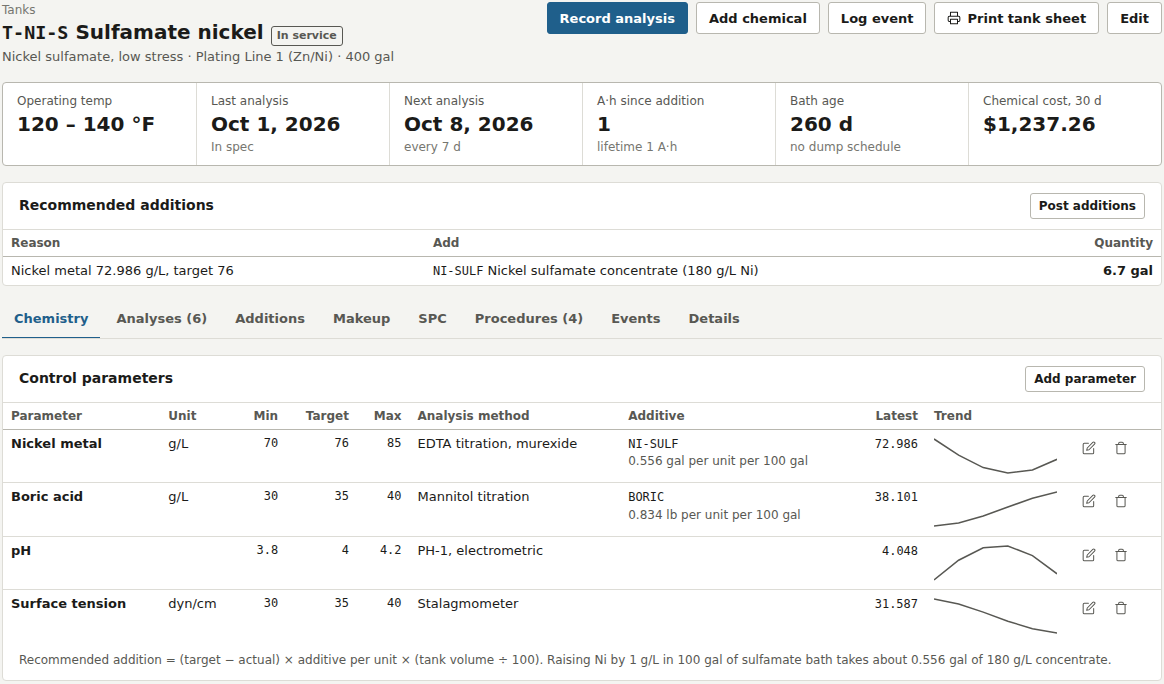
2Tank chemistry with the arithmetic done.
Enter the titration and the test method's formula works out the result, with the work shown. Amp-Hour compares it to your limits and works out what to add from the tank volume. Send that as an add request: the person who adds it confirms from a phone, and the chemical comes out of inventory. Brightener is replenished from amp-hours. Every parameter has a control chart.
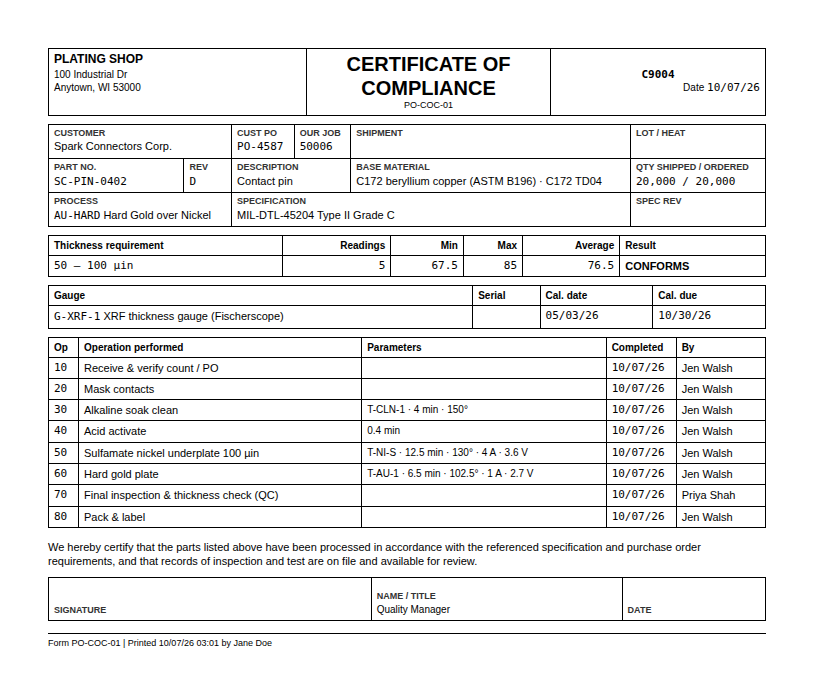
3Certs, shipping and invoicing in one step.
Ship Jobs prints the packing slip and carton labels, issues the certificate of compliance with the spec revision the job was received to, thickness readings and gauge calibration, and raises the invoice. QC cannot sign off a step that needs readings until they are entered. Customers download their certs and invoices from a portal.
Everything else a shop runs on is in the same system. Each item below opens a page that says what the screen does and what a person does on it.
Getting started
Sample shop, starter kit and the checklist for the first real job.
Jobs, travelers and routings
Routings with tank and window per step; receiving prints the traveler.
Schedule, capacity and the shop floor
The board, load by work center, and scanning to start and complete.
Plant map
Draw the plant and colour it with what the shop records: live tank limits, work in process and people, or rejects and dollars over a period.
Polishing team
Pieces logged by scan for piece pay, inspection with reasons and photos, the polishers' schedule.
Tank chemistry
Titrations worked out by formula, what to add, add requests confirmed from a phone, SPC charts, reagents, Hull cell and AA.
Quality
Incoming inspection, rejects, NCRs and CAPAs, QA tests and HE relief bakes, a customer spec library, deviations and waivers, a training matrix, controlled documents.
Certs, shipping and packaging
Packing slips, carton labels, the cert of compliance and the invoice.
Customers, parts, quotes and pricing
Customer records, parts with their process and price, quotes that become jobs.
Outside processing
A step done by a vendor: the PO, the vendor slip and the count back in.
Maintenance
Work orders, PMs by date or by meter, downtime, and calibration with the jobs an out-of-tolerance gauge touched.
Environmental compliance
Wastewater samples against your permit's limits, hazardous waste, permits, SDS, chrome surface tension and Cr(VI).
Inventory and purchasing
Chemicals and supplies at cost, reorder report, POs, bills and A/P.
Invoicing, receivables, ledger and time
Invoices, payments and deposits, credits and refunds, statements and reminders, a general ledger with P&L by line, the time clock, reports.
Banking, checks and expenses
Statement import and matching, reconciliation, checks on voucher stock, positive pay, expenses and receipts.
Payables, vendor credits and 1099s
Bill approvals, vendor credits, recurring bills, pay-bills runs with discounts, use tax, 1099s.
Sales tax
Rates by place, exemption certificates, the liability report and returns.
Payroll hand-off
Pay periods approved and locked, files for your payroll provider, the register back into the books.
Financial reports, budgets and month-end close
Comparisons, cash basis, cash flow, budgets, the close checklist and plating cost reports.
Switching from QuickBooks
Lists and opening balances from QuickBooks files, previewed row by row and checked against the trial balance.
Precious metals
Daily prices, the surcharge on each invoice, metal reconciliation.
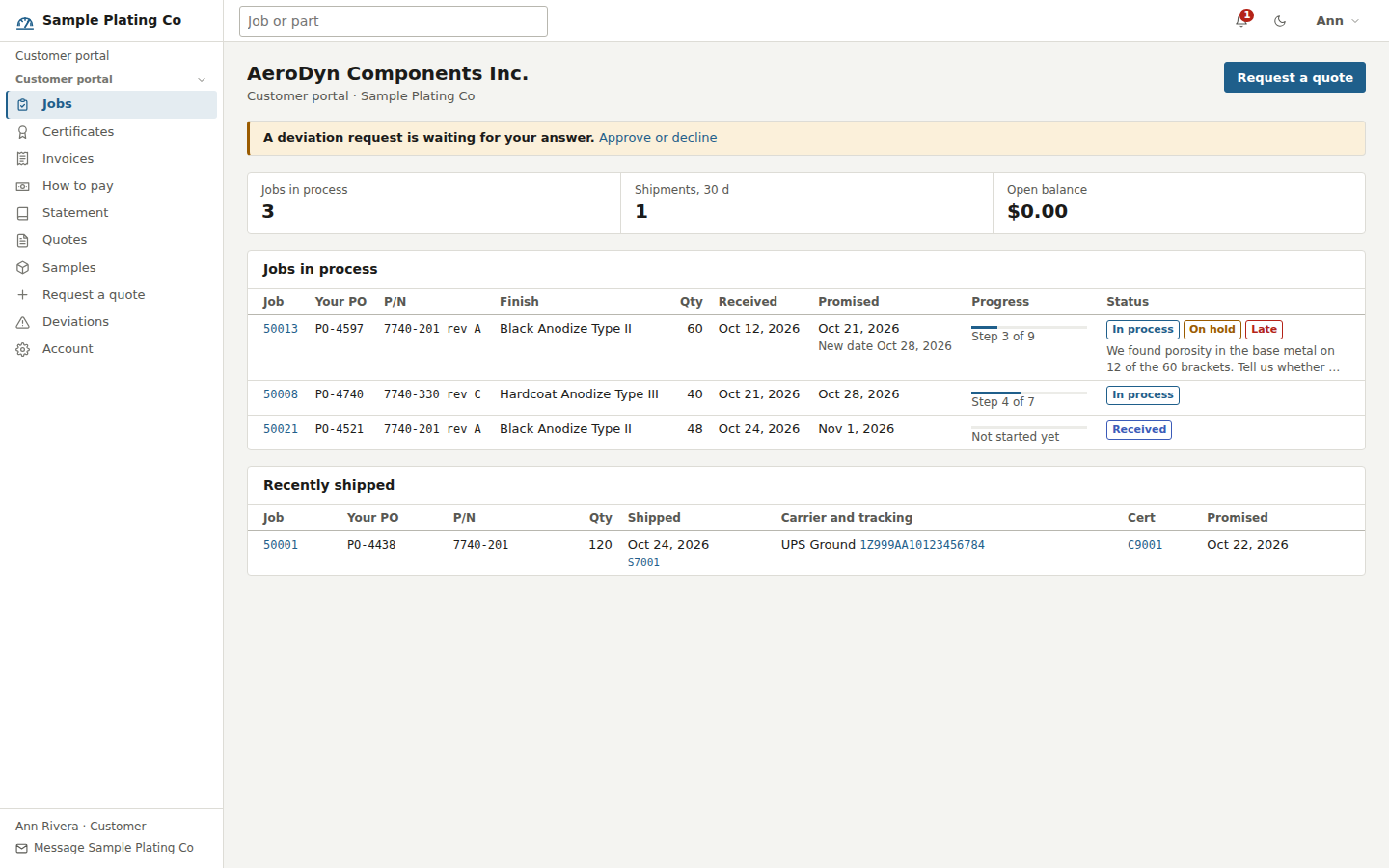
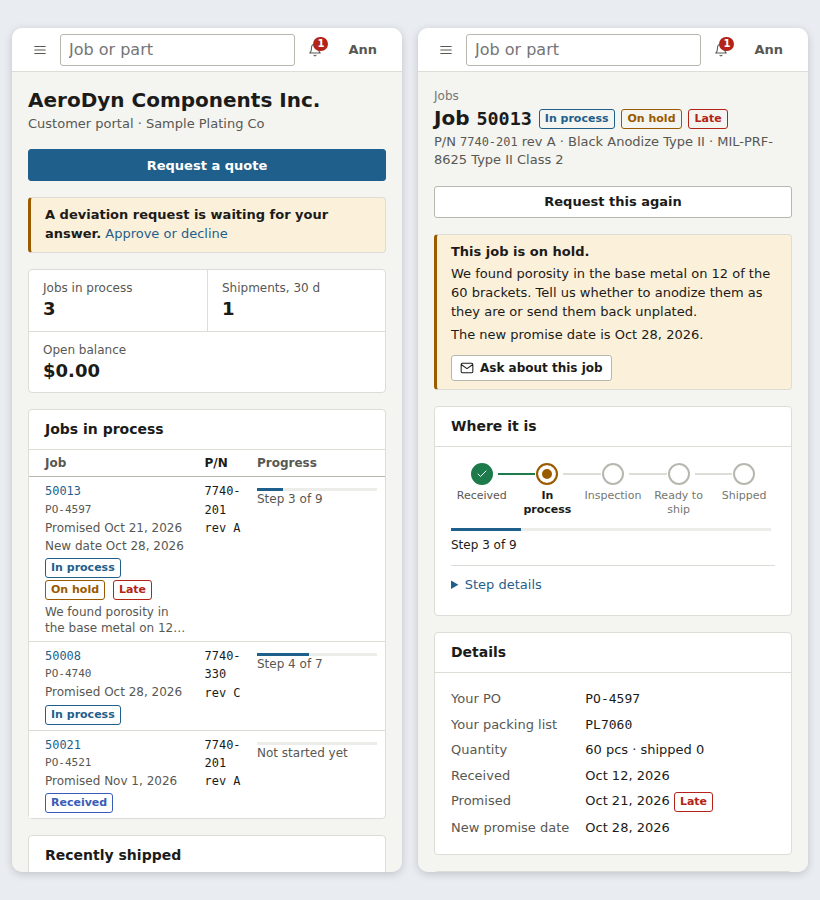
Customer portal
Customers see their jobs, certs, invoices and statement, how to pay, accept quotes and request one, and answer deviation requests.
Library
The shop's own files in folders: process data, SOPs, drawings, certs. 2 to 50 GB by plan.
Team, notifications, messages and security
Roles, staff logins, notifications, messaging between staff, 2FA.
Pricing
Per shop per month, in US dollars. Every plan has every module, unlimited jobs and customers, and the customer portal. Cancel from Settings > Billing at any time.
| Plan | Per month | Staff logins | Storage | Support |
|---|---|---|---|---|
| Starter | $149 | 5 | 2 GB | Email, reply within one business day |
| ProfessionalTrial plan | $349 | 25 | 10 GB | Email, same business day |
| Business | $699 | Unlimited | 50 GB | Email, same business day, plus onboarding and import help |
The 14-day trial runs the Professional plan; a promotion code from a flyer or an email lengthens it, entered on the sign-up form or later under Settings > Billing. A staff login is a person who signs in; customer-portal users are free, up to two outside accountants (the Accountant role) are free, and the shop-floor terminal and time clock run under one login. Storage holds the Library and the files attached to records; more can be added to any plan on request. Need more people or storage than a plan holds? Ask about custom pricing from Settings > Billing.
Annual billing, purchase orders or running it on your own server: support@amphour.io.
Support
Email support@amphour.io. The people who write the software answer it. Demos are 30 minutes over a screen share, on your own parts and processes.
Switching from another system? Settings > Data imports your setup from CSV, every setup table from employees, areas and tanks to parts, travelers and specs, in order and with a dry run first, and we help with the rest during onboarding.